Hardware reference
Parts
| Role | Part | Notes |
|---|---|---|
| MCU | ESP32-S3 DevKitC-1 class | Dual Type-C N16R8 |
| IMU | LSM6DSO / LSM6DSX | 6-axis, I2C at 0x6A |
| Display | ST7789 | Estardyn 2.0″ |
| Breadboard | Any solderless | Half-size 400 or full 830 |
| Jumpers | DuPont | M–M for board↔board / board↔rail |
Breadboard (default connectivity)
Nothing is “wired” yet — the plastic board already has metal clips under the holes. Know that map before Phase 2, or a star becomes accidental shorts.
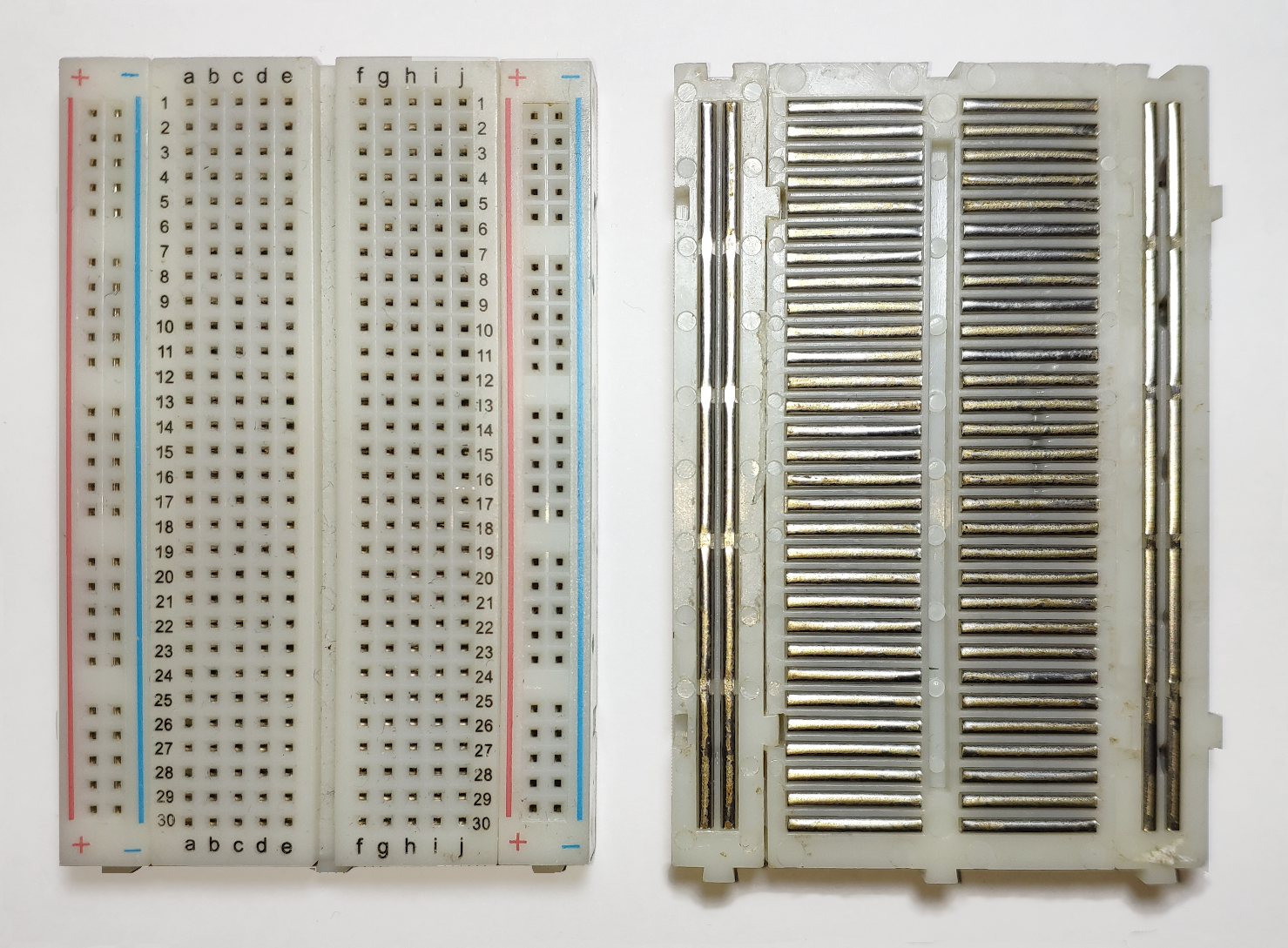
| Region | How holes are tied (factory default) |
|---|---|
| Terminal strips | Each row of five (a–e or f–j) is one net. Same-number left and right are not joined — the centre trench isolates them. |
| Power rails | The + column is one vertical net; the − column is another. Red/+ → 3V3, blue/− → GND in this lab. |
| Rail gaps | Many boards break each rail halfway. Bridging the gap with a short jumper makes one continuous rail. |
Pick one + rail and one − rail as the 3V3/GND star. Run S3 3V3 and GND into those rails once, then tap modules from the rails — don’t daisy-chain module-to-module for power.
Credit: connections photo Guhuru (CC0); empty board oomlout (CC BY-SA 2.0).


Wiring diagram (pad-to-pad)
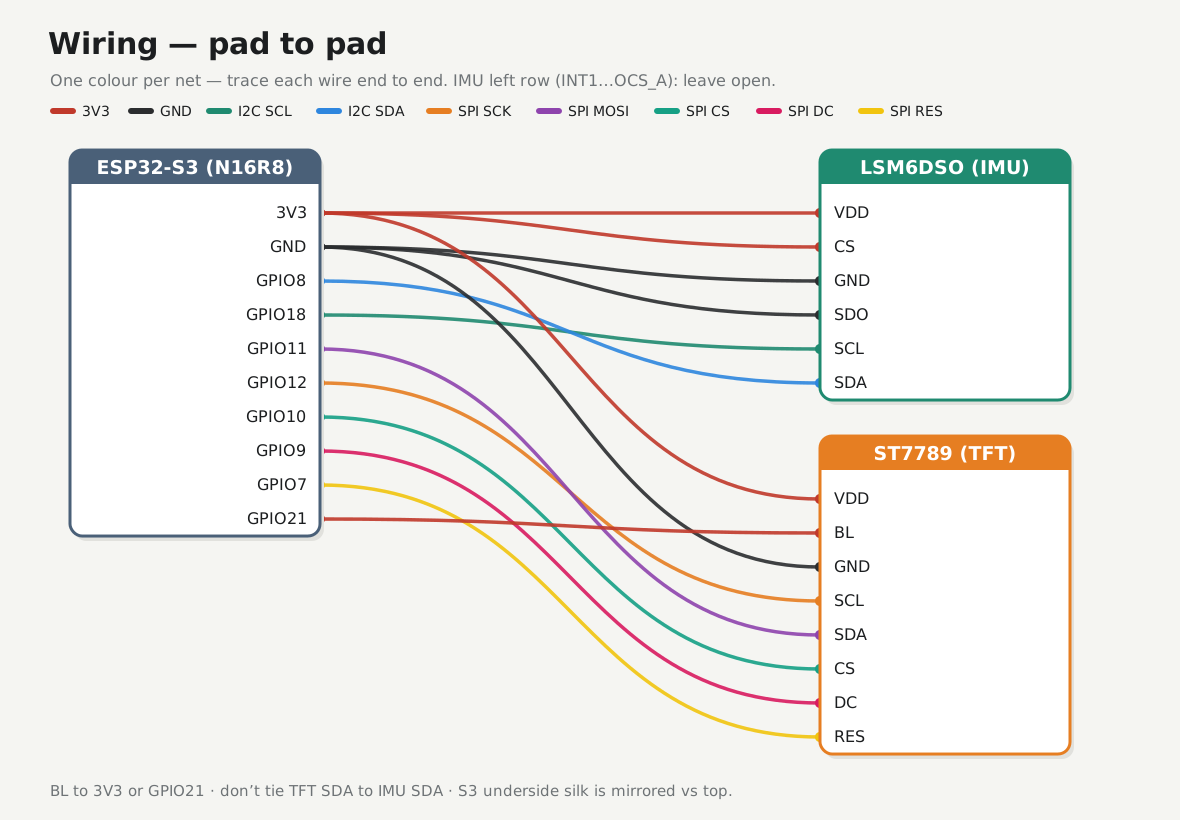
Every net, colour-coded. Prefer the pad-to-pad photo overlay if you’d rather trace wires on the real board silk.
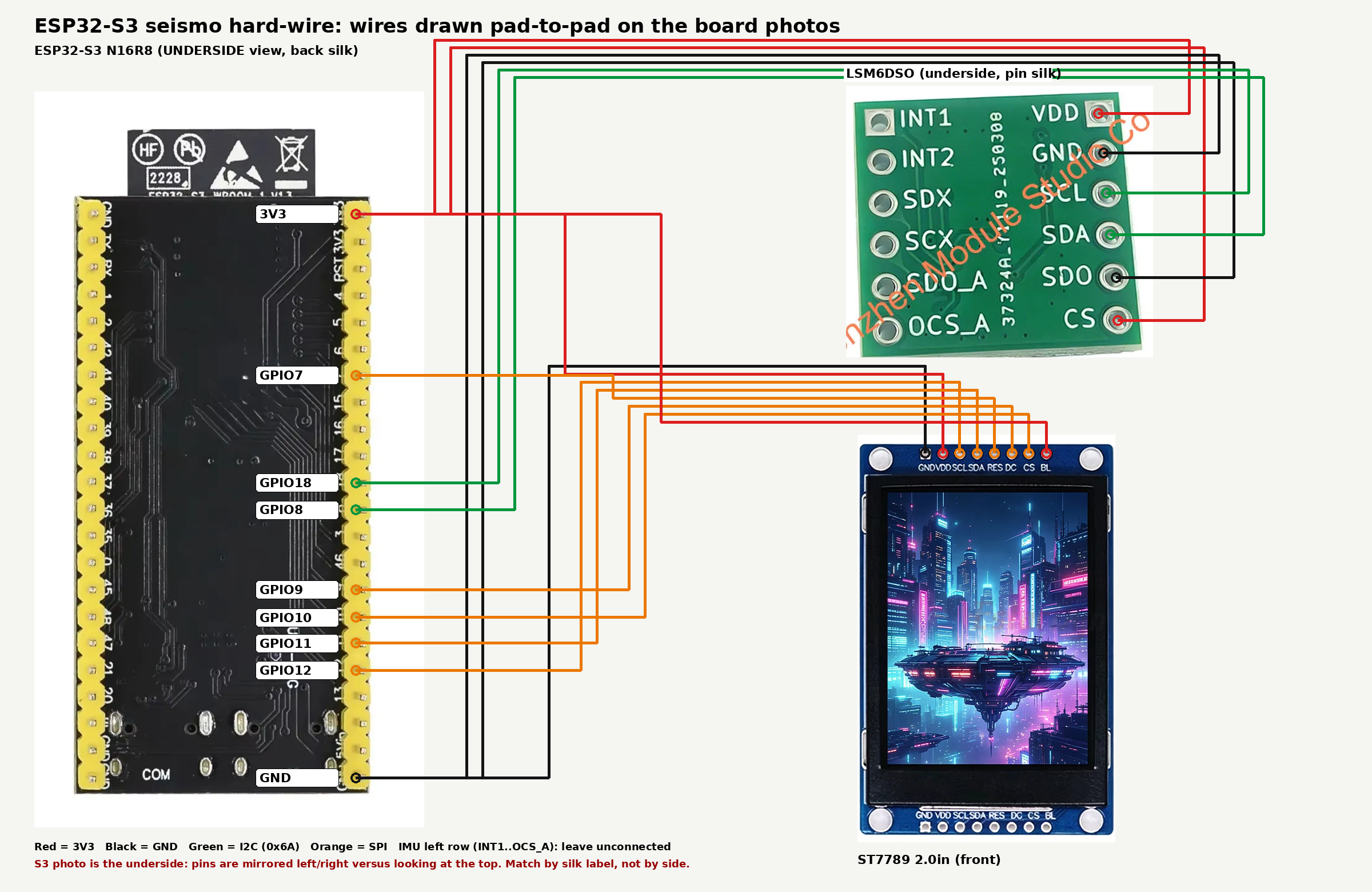
Bench cheat sheet
ESP32-S3          LSM6DSX                 ST7789
--------          -------                 ------
3V3        -----> VDD, CS                 VDD, (BL)
GND        -----> GND, SDO                GND
GPIO8      -----> SDA
GPIO18     -----> SCL
GPIO11     -----------------------------> SDA (MOSI)
GPIO12     -----------------------------> SCL (SCK)
GPIO10     -----------------------------> CS
GPIO9      -----------------------------> DC
GPIO7      -----------------------------> RES
GPIO21     -optional--------------------> BL
Rules
- I2C address 0x6A: IMU CS→3V3, SDO→GND
- Do not join TFT SDA to IMU SDA
- IMU left row (
INT1…OCS_A): leave open for v1 - Avoid GPIO 0 / 19 / 20 / 38 / 48 / 45 / 46 (and 35–37 on Octal PSRAM)
- S3 underside silk is mirrored vs top — match by label
Silk (from listing photos)
IMU right (top→bottom): VDD · GND · SCL · SDA · SDO · CS
TFT left→right: GND · VDD · SCL · SDA · RES · DC · CS · BL
Confirm TFT 4-SPI (silk R3+R5).
Asset index
| File | What |
|---|---|
assets/breadboard-empty.jpg |
Empty breadboard (prereq desk) |
assets/breadboard-connections.png |
Top + underside clips (default nets) |
assets/wiring-schematic.svg |
Schematic wiring (all nets, colour-coded) |
assets/render_wiring_schematic.py |
Schematic wiring diagram |
assets/wiring-diagram-real.png |
Full pad-to-pad photo overlay |
assets/wiring-phase2-tft.svg |
Phase 2 TFT power (schematic) |
assets/wiring-phase3-imu.svg |
Phase 3 IMU power (schematic) |
assets/render_phase_power_schematic.py |
Phase 2–6 wiring schematics |
assets/wiring-phase4-i2c.svg |
Phase 4 I2C data (schematic) |
assets/wiring-phase6-tft.svg |
Phase 6 TFT SPI (schematic) |
assets/08-esp32s3-pinout.png |
S3 underside silk |
assets/02-lsm6dso-pinout-bottom.png |
IMU pin silk |
assets/04-tft-front.png |
TFT header silk |
assets/render_wiring.py |
Photo-overlay diagram |
assets/09-esp32s3-headers.png |
S3 board source photo (cropped for landing page) |
assets/esp32s3-board-top.png |
S3 board, components side (landing page) |
assets/07-intensity-ui-demo.png |
Phase 7 as-built (cropped + enhanced) |
assets/07-intensity-ui-src.jpeg |
Phase 7 as-built, original photo |
assets/enhance_phase7.py |
Crops + enhances the Phase 7 photo |
assets/og-image.jpg |
1200×630 social/OG preview |
assets/make_og.py |
Builds the OG image from the Phase 7 photo |
assets/favicon.svg |
Seismogram favicon (source) |
assets/favicon.png |
32×32 favicon |
assets/apple-touch-icon.png |
180×180 Apple touch icon |
assets/favicon-512.png |
512×512 icon (PWA / large) |
assets/overview-blocks.svg |
High-level block diagram (landing page) |
assets/render_overview.py |
Overview block diagram |
assets/crop_board.py |
Crops the board shot for the landing page |