Phase 0 — USB, detect, erase
Get the PC talking to the board, prove it’s an N16R8, wipe flash so Phase 1 starts clean.
Before this: Prerequisites — packages + PlatformIO installed (pio / esptool on your PATH).
Firmware
Chip is empty after erase. No phase folder under firmware/ yet — Phase 1 adds 01-hello/. Tracker: Firmware.
flowchart LR
  PC[Linux PC] -->|data USB-C| COM[COM CH343]
  COM --> S3[ESP32-S3]
  S3 --> Flash["16MB flash"]
0.1 Serial permissions (once per machine)
PlatformIO needs dialout + udev rules. From the repo root:
sudo ./scripts/setup-linux-usb.sh
Installing udev rules → /etc/udev/rules.d/99-platformio-udev.rules
Reloading udev
Adding johna to group dialout

Setup complete.

Next steps (required):
  1. Log out and log back in (or reboot) so group membership applies.
  2. Unplug and replug the ESP32 USB cable.
  …
Log out/in (or reboot), then confirm:
groups | grep dialout
test -f /etc/udev/rules.d/99-platformio-udev.rules && echo udev_ok
dialout
udev_ok
Don’t sudo pio upload — fix groups instead.
0.2 Plug COM, not USB-OTG
Two Type-C sockets on the board. Use the COM / UART one (CH343 bridge). Leave the USB-OTG socket alone for this walkthrough.
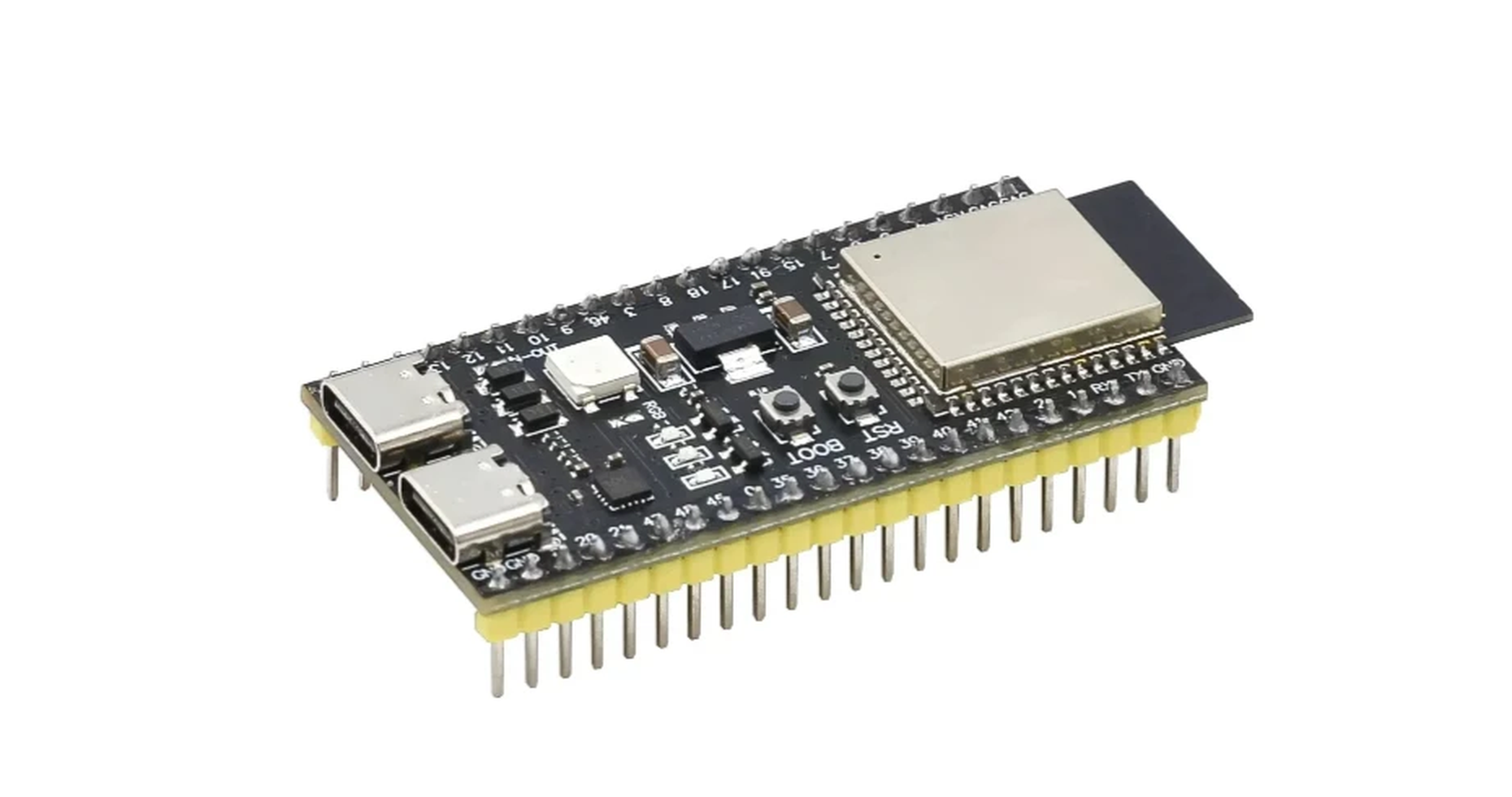
| Socket | Role | This phase |
|---|---|---|
| COM | UART via CH343 → /dev/ttyACM0 |
Plug here |
| USB | Native USB-OTG | Leave unplugged |
Use a data cable. Power LED should come on.
Buttons you’ll care about later: BOOT and RST/EN. If upload hangs on Connecting…, hold BOOT, tap RST, release BOOT. We didn’t need that here — esptool reset via RTS on its own.
0.3 See the serial device
If the host only shows root hubs, the cable or port is wrong (we hit this first):
lsusb
ls /dev/ttyACM* /dev/ttyUSB* 2>/dev/null
Bus 001 Device 001: ID 1d6b:0002 Linux Foundation 2.0 root hub
Bus 002 Device 001: ID 1d6b:0003 Linux Foundation 3.0 root hub
# no ttyACM / ttyUSB — try the other Type-C and another data cable
When COM is right:
lsusb
ls -la /dev/ttyACM* /dev/serial/by-id/
Bus 001 Device 071: ID 1a86:55d3 QinHeng Electronics USB Single Serial
crw-rw-rw- 1 root dialout … /dev/ttyACM0
…/by-id/usb-1a86_USB_Single_Serial_5CE5196417-if00 -> ../../ttyACM0
That’s CH343 → /dev/ttyACM0. (Native USB-OTG would show Espressif 303a:… — we stay on COM.)
0.4 Chip and flash
Chip
~/.platformio/penv/bin/esptool --chip esp32s3 --port /dev/ttyACM0 chip-id
Connected to ESP32-S3 on /dev/ttyACM0:
Chip type:          ESP32-S3 (QFN56) (revision v0.2)
Features:           … Embedded PSRAM 8MB (AP_3v3)
Crystal frequency:  40MHz
MAC:                28:84:85:8c:d0:40
Hard resetting via RTS pin...
Flash
~/.platformio/penv/bin/esptool --chip esp32s3 --port /dev/ttyACM0 flash-id
Manufacturer: 68
Device: 4018
Detected flash size: 16MB
Flash type set in eFuse: quad (4 data lines)
Flash voltage set by eFuse: 3.3V
| Item | This board (N16R8) |
|---|---|
| Chip | ESP32-S3 rev v0.2 |
| Flash | 16MB |
| PSRAM | 8MB |
| MAC | 28:84:85:8C:D0:40 |
0.5 Erase
Warning
erase-flash wipes everything on the chip. Only run it once /dev/ttyACM0 is confirmed above — this is the clean start for Phase 1.
~/.platformio/penv/bin/esptool --chip esp32s3 --port /dev/ttyACM0 erase-flash
Erasing flash memory (this may take a while)...
Flash memory erased successfully in 3.4 seconds.
Hard resetting via RTS pin...
Checkpoint 0
You’re done when:
- [x]
dialout+ udev rules in place - [x]
lsusbshows the bridge (1a86:55d3here) - [x]
/dev/ttyACM0exists and your user can open it - [x] chip-id / flash-id say ESP32-S3, 16MB flash, 8MB PSRAM
- [x] erase-flash finishes cleanly
Notes: Lab log.
Next: Phase 1 — Hello flash